Cjam Website
Cjam
Overview
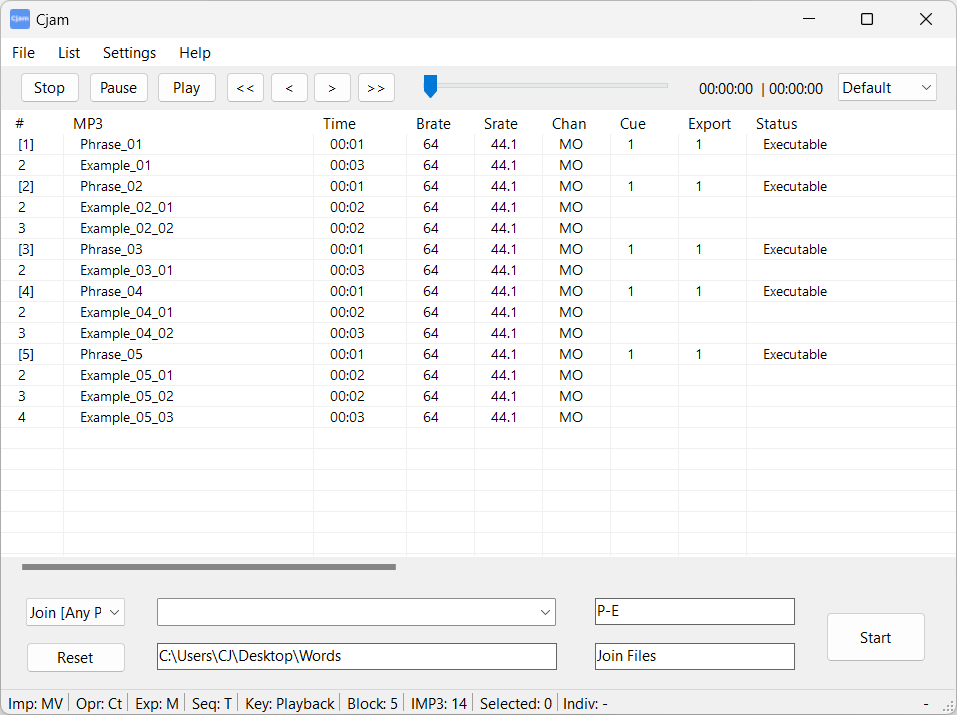
Cjam is non-destructive MP3 editing software designed for Windows PCs. Files are imported by dragging and dropping them onto the interface, after which they can be processed and exported according to the specified settings. Operations can be defined using text input, allowing multiple independent actions to be executed sequentially. The software enables fast editing without the need for decoding and re-encoding the audio.
Key Features
- Cut MP3 files
- Join MP3 files
- Add fade effects to MP3 files
- Add silent intervals to MP3 files
- Play MP3 files
- Operate using text commands
- Save settings
Download
Download Cjam
Version: 2.7.5.0
Release Date: Oct 17, 2026
File Size: 54.4 MB
SHA-256: 49366c5fa059b55a3f36754073b54e957eba35af8e10d557f11174173754bc6a
Includes the .NET 8 runtime. No additional software is required.
If the latest version cannot be downloaded, the previous version is available here.
For more information, see the forum.
Resources for multiple languages are available here.
Alternative Downloads
Framework-dependent (.NET 8)
Requires Microsoft .NET 8 Runtime.
File Size: 2.09 MB
SHA-256: 1d3afadaa5221f1f1f9ccca933c16631c3101abe45741b328ddc7fe8a097252e
Framework-dependent (.NET 6)
Requires Microsoft .NET 6 Runtime.
File Size: 2.09 MB
SHA-256: dc9b5ddcddc75428aedc94c5a98a08d4d6ece5bd0a9efc3c215a4e3cbbedefa1
Supported Devices
- Microsoft Windows 10 or later
Supported File Formats
- MP3 (*.mp3)
- CUE (*.cue)
- M3U (*.m3u)
- CJAMC (*.cjc) - Cjam’s custom format
- CJAMJ (*.cjj) - Cjam’s custom format
- CJAM (*.cjm) - Cjam’s custom format
- CJAMT (*.cjt) - Cjam’s custom format
- TXT (*.txt)
Installation and Execution
- Extract the ZIP file.
- Place the “Cjam” folder on a drive with read/write access.
- Run “Cjam.exe”.
Changelog
Version 1.0.0.0 - Dec 21, 2019
Version 2.0.0.0 - Jun 28, 2025
Version 2.7.5.0 - Oct 17, 2026
- Fixed a bug that caused an error when displaying image files with incorrect extensions
- Posted text for several language files on the forum:
For detailed update information, see the full changelog.